Persistent / Local フラグと継承機構(spf13/pflag)
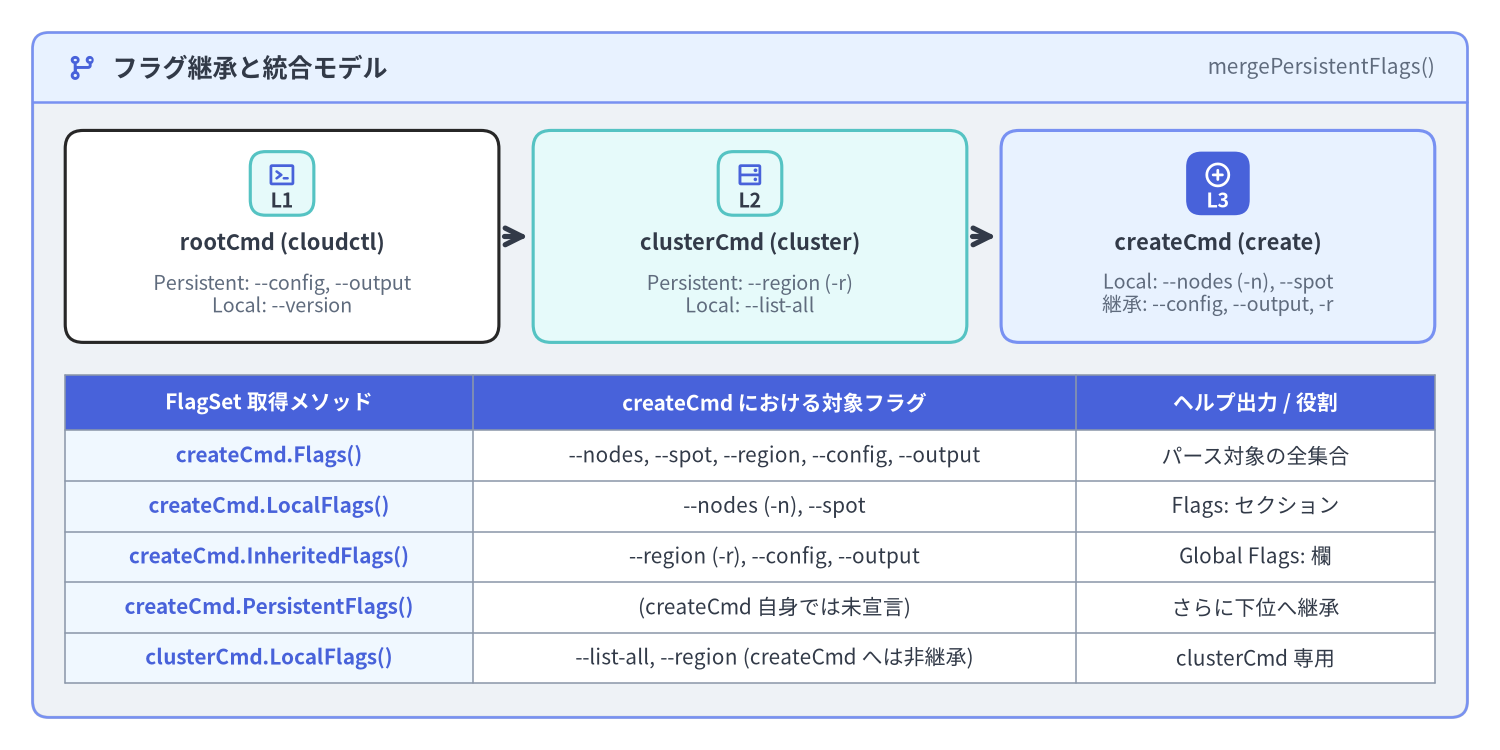
Cobra のフラグ解析は、Go 標準 flag パッケージを POSIX/GNU 準拠に拡張した github.com/spf13/pflag によって駆動されています。Cobra は pflag.FlagSet の上に、コマンドツリーの親子関係に応じたフラグ継承モデル(PersistentFlags()、Flags()、InheritedFlags()、LocalFlags())、親コマンドのローカルフラグ走査(TraverseChildren)、およびグローバルなフラグ名正規化(SetGlobalNormalizationFunc)を構築しています。本ページでは Cobra v1.10.2 におけるフラグ機構のすべてを解説します。
Source Code
from drawlib.canvas import save, setup
from drawlib.icons import phosphor
from drawlib.preset_colors import CssColors
from drawlib.smartarts import CardList, Panel, Table
from drawlib.styles import Colors, Styles

setup(width=184, height=92, dpi=150)

outer = Panel(
    "フラグ継承と統合モデル",
    "mergePersistentFlags()",
    style=Styles.Neutral.patch(shape_r=2.0),
    header_style=Styles.PrimaryNeutral.patch(shape_line_width=1.2),
    text_style=Styles.DarkBold.patch(text_size=12.0),
    description_style=Styles.Muted.patch(text_size=10.0),
    icon=phosphor.git_branch,
    icon_style=Styles.PrimaryBold,
    header_variant="filled",
    header_height=8.5,
)
outer.draw((4.0, 4.0), width=176.0, height=84.0)

tree_cards = CardList(
    style=Styles.White,
    text_style=Styles.DarkBold.patch(text_size=10.5),
    description_style=Styles.Muted.patch(text_size=9.5),
    badge_shape="rounded_rect",
    badge_style=Styles.SecondaryNeutral,
    badge_text_style=Styles.DarkBold.patch(text_size=9.5),
    icon_style=Styles.PrimaryBold,
    direction="horizontal",
    show_arrows=True,
    arrow_style=Styles.DarkBold,
    spacing=4.0,
)
tree_cards.add(
    "rootCmd (cloudctl)",
    "Persistent: --config, --output\nLocal: --version",
    badge_text="L1",
    icon=phosphor.terminal_window,
)
tree_cards.add(
    "clusterCmd (cluster)",
    "Persistent: --region (-r)\nLocal: --list-all",
    badge_text="L2",
    icon=phosphor.hard_drives,
    style=Styles.SecondaryNeutral,
)
tree_cards.add(
    "createCmd (create)",
    "Local: --nodes (-n), --spot\n継承: --config, --output, -r",
    badge_text="L3",
    icon=phosphor.plus_circle,
    style=Styles.PrimaryNeutral,
    badge_style=Styles.PrimaryFlat,
    badge_text_style=Styles.WhiteBold.patch(text_size=9.5),
    icon_style=Styles.WhiteBold,
)
tree_cards.draw(xy=(8.0, 50.0), width=168.0, height=26.0)

tbl = Table(
    cell_style=Styles.White,
    text_style=Styles.Dark.patch(text_size=10.0),
    header_cell_style=Styles.PrimaryFlat,
    header_text_style=Styles.WhiteBold.patch(text_size=10.0),
    border_style=Styles.MutedThin,
)
tbl.set_style_cell_evenodd(
    even_color=Colors.Light,
    even_text_style=Styles.Dark.patch(text_size=10.0),
    odd_color=Colors.White,
    odd_text_style=Styles.Dark.patch(text_size=10.0),
)
tbl.set_style_cell_header(
    background_color=Styles.PrimaryFlat.shape_fill_color,
    text_style=Styles.WhiteBold.patch(text_size=10.0),
)
tbl.set_style_cell(
    background_color=CssColors.AliceBlue,
    text_style=Styles.PrimaryBold.patch(text_size=10.0),
    rows=[1, 2, 3, 4, 5],
    columns=[0],
)

rows = [
    ["FlagSet 取得メソッド", "createCmd における対象フラグ", "ヘルプ出力 / 役割"],
    ["createCmd.Flags()", "--nodes, --spot, --region, --config, --output", "パース対象の全集合"],
    ["createCmd.LocalFlags()", "--nodes (-n), --spot", "Flags: セクション"],
    ["createCmd.InheritedFlags()", "--region (-r), --config, --output", "Global Flags: 欄"],
    ["createCmd.PersistentFlags()", "(createCmd 自身では未宣言)", "さらに下位へ継承"],
    ["clusterCmd.LocalFlags()", "--list-all, --region (createCmd へは非継承)", "clusterCmd 専用"],
]

tbl.draw_flexible(
    xy=(8.0, 46.0),
    column_widths=[50.0, 74.0, 44.0],
    row_heights=[6.8, 6.2, 6.2, 6.2, 6.2, 6.2],
    data=rows,
    align="top_left",
)

save()
1. PersistentFlags() と Flags() の違いと継承アルゴリズム
すべての cobra.Command は、フラグ登録用に2つの主要な pflag.FlagSet を保持しています。
cmd.Flags()(内部フィールドc.flags): そのコマンド自身でのみ有効なローカルフラグ を登録します。実行時のParseFlags()直前に呼ばれるmergePersistentFlags()によって、自身のPersistentFlags()とすべての親・祖先コマンドのPersistentFlags()(c.parentsPflags)がc.flagsにマージされます。cmd.PersistentFlags()(内部フィールドc.pflags): そのコマンド自身、および配下のすべての子孫サブコマンド(子・孫・曾孫…)に自動継承される永続フラグを登録します。
cobra.Command が提供する5つの FlagSet アクセサ
| メソッド | 内部フィールド | 返される FlagSet の内容 |
|---|---|---|
cmd.Flags() |
c.flags |
mergePersistentFlags() 統合後の完全な FlagSet(ローカル+自身の永続+親から継承した永続フラグ)。 |
cmd.PersistentFlags() |
c.pflags |
その cmd で 直接 登録された永続フラグのみ。 |
cmd.LocalFlags() |
c.lflags (動的計算) |
その cmd で直接宣言されたフラグ(Flags() と PersistentFlags() の両方)、および親の同名永続フラグを上書き(シャドウイング)したフラグ。--help の Flags: セクションに出力される。 |
cmd.InheritedFlags() |
c.iflags (動的計算) |
親・祖先コマンドから継承された永続フラグ(c.parentsPflags)。--help の Global Flags: セクションに出力される。 |
cmd.LocalNonPersistentFlags() |
動的生成 FlagSet |
cmd.Flags() に登録されたフラグのうち、cmd.PersistentFlags() に含まれない純粋なローカルフラグ。 |
親の永続フラグのシャドウイング(上書き): もし親の
rootCmd.PersistentFlags()で--timeout=30sが定義されている状態で、子のdeployCmd.Flags()が同名のローカルフラグ--timeout=5mを定義した場合、mergePersistentFlags()は既存のフラグを上書きしないため、deployCmdの実行時には子自身の--timeout=5mが優先されます。
2. spf13/pflag による型付きフラグバインド
フラグの値を取得する際は、RunE の中で cmd.Flags().GetString("...") を呼ぶのではなく、コマンドの *Options 構造体のフィールドに対して *Var / *VarP ポインタバインドメソッド を使うのがベストプラクティスです(文字列キーのタイポを防ぎ、Validate() でそのまま型付きフィールドを検証できます)。
package cluster

import (
	"net"
	"time"

	"github.com/spf13/cobra"
)

type CreateOptions struct {
	ClusterName string
	Nodes       int
	Spot        bool
	Timeout     time.Duration
	Zones       []string
	Labels      map[string]string
	APIServerIP net.IP
	Verbosity   int
}

func NewCmdClusterCreate() *cobra.Command {
	o := &CreateOptions{}

	cmd := &cobra.Command{
		Use:   "create <cluster-name>",
		Short: "新しい Kubernetes クラスタを作成",
		Args:  cobra.ExactArgs(1),
		RunE: func(cmd *cobra.Command, args []string) error {
			o.ClusterName = args[0]
			// ユーザーが明示的に --nodes フラグを指定したかどうかを判定
			if cmd.Flags().Changed("nodes") {
				cmd.Printf("ノード数が明示的に指定されました: %d\n", o.Nodes)
			}
			return nil
		},
	}

	f := cmd.Flags()

	// 1. 基本型: IntVarP, BoolVar, DurationVar (末尾 P は1文字の短縮フラグを受け取る)
	f.IntVarP(&o.Nodes, "nodes", "n", 3, "初期ワーカーノード数")
	f.BoolVar(&o.Spot, "spot", false, "スポットインスタンスを使用")
	f.DurationVar(&o.Timeout, "timeout", 10*time.Minute, "プロビジョニングのタイムアウト (例: 5m, 300s)")

	// 2. スライスとマップ: StringSliceVar はカンマ分割を行う、StringArrayVar はカンマ分割を行わない
	f.StringSliceVarP(&o.Zones, "zone", "z", []string{"us-east-1a"}, "対象アベイラビリティゾーン (カンマ区切りまたは複数指定)")
	f.StringToStringVar(&o.Labels, "label", nil, "クラスタに付与する key=value ラベル (例: --label env=prod,team=core)")

	// 3. ネットワーク型・カウンタ型: IPVar, CountVarP (-v = 1, -vvv = 3)
	f.IPVar(&o.APIServerIP, "api-ip", net.ParseIP("10.0.0.1"), "コントロールプレーンの固定 IP")
	f.CountVarP(&o.Verbosity, "verbose", "v", "ログ詳細度の引き上げ (-v, -vv, -vvv)")

	return cmd
}
頻出の注意点:StringSliceVar と StringArrayVar の違い
pflag メソッド |
入力: --arg="a,b" --arg="c" |
パース結果 []string |
推奨される使い分け |
|---|---|---|---|
StringSliceVar |
CSV パーサによりカンマ , で分割される |
[]string{"a", "b", "c"} |
タグ一覧やゾーン名など、値自体にカンマが含まれない識別子リスト。 |
StringArrayVar |
カンマで分割せず、指定された文字列をそのまま追加 | []string{"a,b", "c"} |
フィルタ条件式・JSON 文字列・ファイルパスなど、値の中にカンマが含まれる可能性がある場合。 |
3. 明示的指定の判定(Changed)と省略時デフォルト値(NoOptDefVal)
3.1 デフォルトのゼロ値と明示的なゼロ指定を区別する(Flags().Changed)
Go では int のゼロ値は 0、bool のゼロ値は false です。リソース更新コマンド(例: cloudctl cluster update prod --nodes=0 でノード数を0にスケールインしたい場合)において、「ユーザーが --nodes を省略したのか」それとも「明示的に --nodes=0 を指定したのか」を判別するには cmd.Flags().Changed("nodes") を使用します。
if cmd.Flags().Changed("nodes") {
	// デフォルト値と同じ値であっても、コマンドライン上で明示的に指定された場合のみ true になる
	patchReq.Nodes = &o.Nodes
}
3.2 値省略時のデフォルト値を設定する(NoOptDefVal)
単なるスイッチ(--output)としても、値付き(--output=yaml)としても使えるハイブリッドなフラグを作るには、Flag.NoOptDefVal を設定します。
cmd.Flags().StringVarP(&o.Output, "output", "o", "table", "出力フォーマット (table|json|yaml)")
cmd.Flags().Lookup("output").NoOptDefVal = "json"
// 動作:
//   cloudctl get pods            -> o.Output == "table" (通常のデフォルト値)
//   cloudctl get pods --output   -> o.Output == "json"  (フラグ名のみ指定時の NoOptDefVal)
//   cloudctl get pods -o=yaml    -> o.Output == "yaml"  (明示的な指定値)
4. TraverseChildren とフラグ名のグローバル正規化
Source Code
from drawlib.canvas import save, setup
from drawlib.icons import phosphor
from drawlib.smartarts import CardList, Panel
from drawlib.styles import Styles

setup(width=184, height=76, dpi=150)

left_panel = Panel(
    "1. Find() vs. TraverseChildren",
    "親ローカルフラグの扱い",
    style=Styles.Neutral.patch(shape_r=2.0),
    header_style=Styles.PrimaryNeutral.patch(shape_line_width=1.2),
    text_style=Styles.DarkBold.patch(text_size=11.5),
    description_style=Styles.Muted.patch(text_size=9.5),
    icon=phosphor.magnifying_glass,
    icon_style=Styles.PrimaryBold,
    header_variant="filled",
    header_height=8.0,
)
left_panel.draw((4.0, 4.0), width=88.0, height=68.0)
l_xy, l_w, l_h = left_panel.get_content_box((4.0, 4.0), width=88.0, height=68.0, padding=(3.5, 2.5))

trav_cards = CardList(
    style=Styles.White,
    text_style=Styles.DarkBold.patch(text_size=10.5),
    description_style=Styles.Muted.patch(text_size=9.5),
    badge_shape="rounded_rect",
    badge_style=Styles.SecondaryNeutral,
    badge_text_style=Styles.DarkBold.patch(text_size=9.5),
    icon_style=Styles.PrimaryBold,
    direction="vertical",
    spacing=2.5,
)
trav_cards.add(
    "デフォルト: TraverseChildren = false",
    "c.Find(args) を実行: 末端コマンドの\nLocal + 継承 Persistent フラグのみ解析",
    badge_text="FIND",
    icon=phosphor.arrow_down,
)
trav_cards.add(
    "オプトイン: TraverseChildren = true",
    "c.Traverse(args) を実行: 経路上のすべての\n親コマンドのローカルフラグも順番に解析",
    badge_text="TRAV",
    icon=phosphor.git_branch,
    style=Styles.PrimaryNeutral,
    badge_style=Styles.PrimaryFlat,
    badge_text_style=Styles.WhiteBold.patch(text_size=9.5),
    icon_style=Styles.WhiteBold,
)
trav_cards.draw(l_xy, width=l_w, height=l_h)

right_panel = Panel(
    "2. フラグ名の正規化関数",
    "SetNormalizeFunc",
    style=Styles.Neutral.patch(shape_r=2.0),
    header_style=Styles.SecondaryNeutral.patch(shape_line_width=1.2),
    text_style=Styles.DarkBold.patch(text_size=11.5),
    description_style=Styles.Muted.patch(text_size=9.5),
    icon=phosphor.arrows_left_right,
    icon_style=Styles.DarkBold,
    header_variant="filled",
    header_height=8.0,
)
right_panel.draw((96.0, 4.0), width=84.0, height=68.0)
r_xy, r_w, r_h = right_panel.get_content_box((96.0, 4.0), width=84.0, height=68.0, padding=(3.5, 2.5))

norm_cards = CardList(
    style=Styles.White,
    text_style=Styles.DarkBold.patch(text_size=10.5),
    description_style=Styles.Muted.patch(text_size=9.5),
    badge_shape="rounded_rect",
    badge_style=Styles.SecondaryNeutral,
    badge_text_style=Styles.DarkBold.patch(text_size=9.5),
    icon_style=Styles.PrimaryBold,
    direction="vertical",
    spacing=2.5,
)
norm_cards.add(
    "アンダースコアとハイフンの統一",
    "--dry_run と --dry-run を同一の\nNormalizedName(\"dry-run\") として解決",
    badge_text="N1",
    icon=phosphor.text_aa,
)
norm_cards.add(
    "旧フラグ名の透過的エイリアス",
    "重複登録なしで旧 --master-url を\n新 --server へマッピングし後方互換を維持",
    badge_text="N2",
    icon=phosphor.repeat,
    style=Styles.SecondaryNeutral,
)
norm_cards.draw(r_xy, width=r_w, height=r_h)

save()
4.1 どのような場合に TraverseChildren: true が必要になるか?
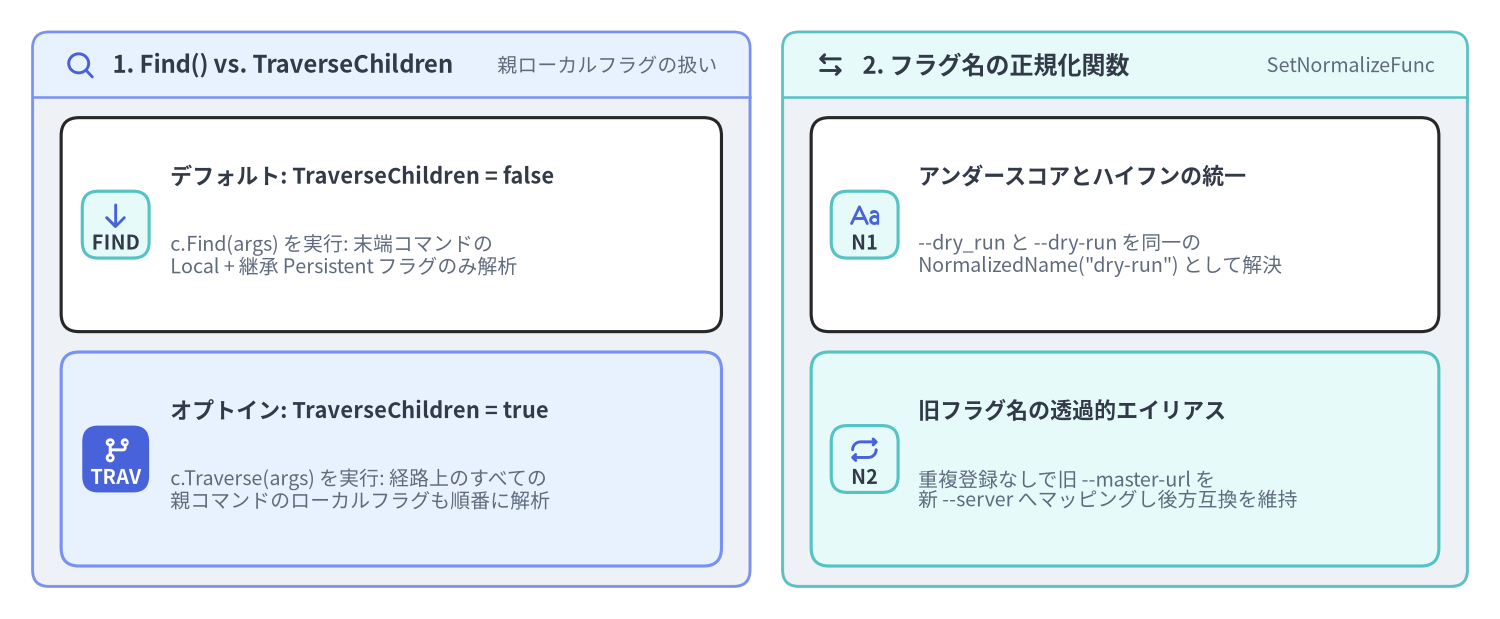
デフォルト(TraverseChildren: false)では、Cobra は c.Find(args) で実行対象の末端サブコマンドを見つけ出し、その末端コマンドに対して1回だけ ParseFlags() を呼び出します。親コマンドの PersistentFlags() は末端コマンドへ自動的にマージされるため、cloudctl --config=prod.yaml cluster create web のような指定は TraverseChildren: false のままでも問題なく動作します。
rootCmd.TraverseChildren = true が必要になるのは、親コマンドが 子へ継承したくないローカルフラグ(rootCmd.Flags()) を持っており、かつサブコマンド実行時にも親コマンドの位置でそのローカルフラグをパースさせたい場合(例: docker --tlsverify container ls)です。
4.2 SetGlobalNormalizationFunc によるフラグ名の正規化とエイリアス
CLI 全体で --dry_run(アンダースコア)と --dry-run(ハイフン)の揺れを吸収したり、旧バージョンのフラグ名を新フラグ名へ透過的に転送したりするには、ルートコマンドに SetGlobalNormalizationFunc を登録します。
import (
	"strings"

	"github.com/spf13/cobra"
	"github.com/spf13/pflag"
)

func configureFlagNormalization(rootCmd *cobra.Command) {
	rootCmd.SetGlobalNormalizationFunc(func(f *pflag.FlagSet, name string) pflag.NormalizedName {
		// 1. すべてのアンダースコアをハイフンへ正規化 (--dry_run -> --dry-run)
		normalized := strings.ReplaceAll(name, "_", "-")

		// 2. 旧フラグ名を新フラグ名へ透過的にエイリアス
		switch normalized {
		case "master-url":
			normalized = "server"
		}
		return pflag.NormalizedName(normalized)
	})
}
rootCmd.SetGlobalNormalizationFunc(fn) を呼び出すと、ルートの Flags() / PersistentFlags() だけでなく、AddCommand() で登録された(または後から追加される)すべての子孫コマンドの FlagSet に対して正規化関数が自動的に伝播します。
次のステップ
続いて 位置引数バリデータとフラググループ制約 に進み、組み込みの位置引数バリデータ(ExactArgs、MatchAll 等)とフラグ間の共起・排他グループ制約(MarkFlagsMutuallyExclusive、MarkFlagsRequiredTogether)を学びましょう。