クイックスタートとサブコマンド構築
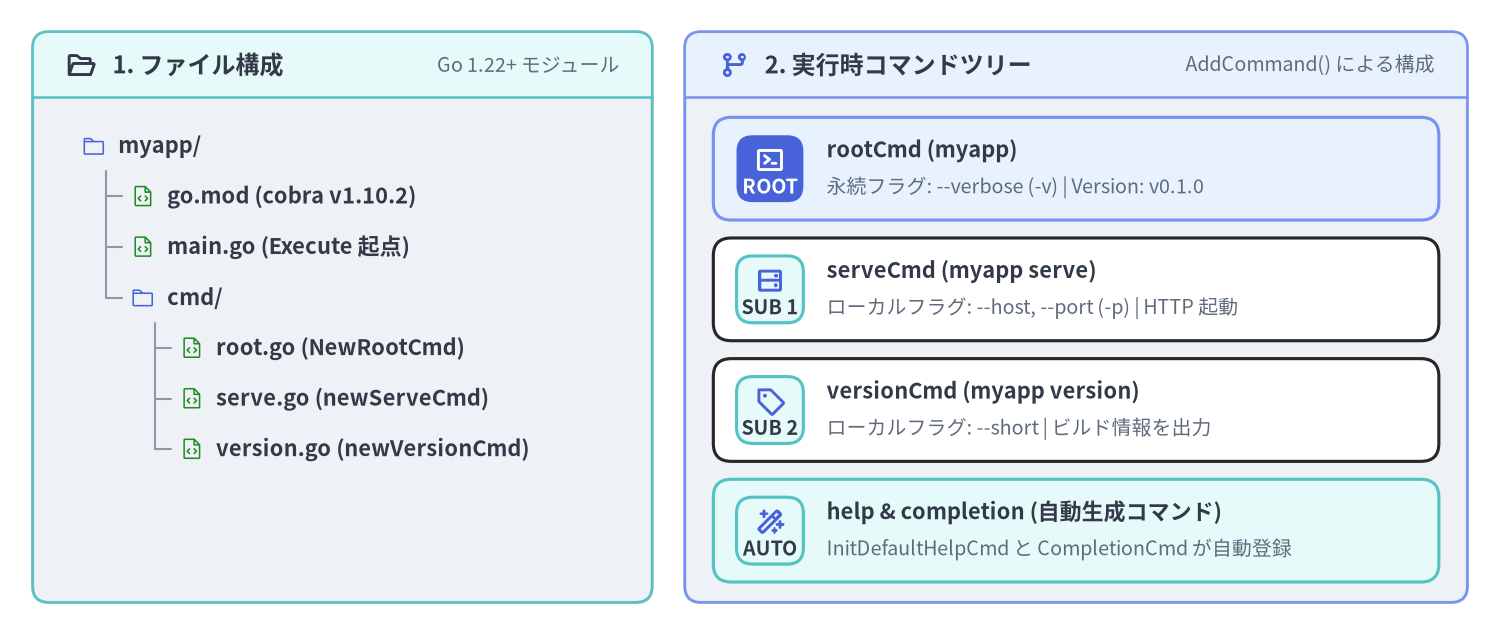
本ページでは、空のディレクトリから出発して github.com/spf13/cobra v1.10.2 を用いたマルチコマンド CLI(myapp)をゼロから構築します。Go モジュールの初期化、ルートコマンド(rootCmd)の定義、2つのサブコマンド(versionCmd と serveCmd)の AddCommand() による接続、エラーを返す RunE ハンドラの実装、そして組み込みの --help / --version 機構の動作確認までを一通り体験します。
Source Code
from drawlib.canvas import save, setup
from drawlib.icons import phosphor
from drawlib.preset_colors import CssColors
from drawlib.smartarts import CardList, Panel, TreeNode
from drawlib.styles import Colors, Styles

setup(width=184, height=78, dpi=150)

left_panel = Panel(
    "1. ファイル構成",
    "Go 1.22+ モジュール",
    style=Styles.Neutral.patch(shape_r=2.0),
    header_style=Styles.SecondaryNeutral.patch(shape_line_width=1.2),
    text_style=Styles.DarkBold.patch(text_size=11.5),
    description_style=Styles.Muted.patch(text_size=9.5),
    icon=phosphor.folder_open,
    icon_style=Styles.DarkBold,
    header_variant="filled",
    header_height=8.0,
)
left_panel.draw((4.0, 4.0), width=76.0, height=70.0)

TreeNode.register_drawing_item(
    name="qs_dir",
    location="before",
    padding_width=4.5,
    function=phosphor.folder,
    style=Styles.Primary.patch(icon_color=Colors.Primary),
    args={"width": 3.0},
)
TreeNode.register_drawing_item(
    name="qs_go",
    location="before",
    padding_width=4.5,
    function=phosphor.file_code,
    style=Styles.Primary.patch(icon_color=CssColors.ForestGreen),
    args={"width": 3.0},
)

tree = TreeNode(
    "myapp/",
    text_style=Styles.DarkBold.patch(text_size=10.5),
    line_style=Styles.Muted.patch(line_width=1.0),
    line_horizontal_margin=3.0,
    line_horizontal_length=3.0,
    line_vertical_margin=6.2,
    children=[
        TreeNode("go.mod (cobra v1.10.2)").set_drawing_item("qs_go"),
        TreeNode("main.go (Execute 起点)").set_drawing_item("qs_go"),
        TreeNode(
            "cmd/",
            children=[
                TreeNode("root.go (NewRootCmd)").set_drawing_item("qs_go"),
                TreeNode("serve.go (newServeCmd)").set_drawing_item("qs_go"),
                TreeNode("version.go (newVersionCmd)").set_drawing_item("qs_go"),
            ],
        ).set_drawing_item("qs_dir"),
    ],
).set_drawing_item("qs_dir")
tree.draw(xy=(10.0, 60.0))

right_panel = Panel(
    "2. 実行時コマンドツリー",
    "AddCommand() による構成",
    style=Styles.Neutral.patch(shape_r=2.0),
    header_style=Styles.PrimaryNeutral.patch(shape_line_width=1.2),
    text_style=Styles.DarkBold.patch(text_size=11.5),
    description_style=Styles.Muted.patch(text_size=9.5),
    icon=phosphor.git_branch,
    icon_style=Styles.PrimaryBold,
    header_variant="filled",
    header_height=8.0,
)
right_panel.draw((84.0, 4.0), width=96.0, height=70.0)
r_xy, r_w, r_h = right_panel.get_content_box((84.0, 4.0), width=96.0, height=70.0, padding=(3.5, 2.5))

cmds = CardList(
    style=Styles.White,
    text_style=Styles.DarkBold.patch(text_size=10.5),
    description_style=Styles.Muted.patch(text_size=9.5),
    badge_shape="rounded_rect",
    badge_style=Styles.SecondaryNeutral,
    badge_text_style=Styles.DarkBold.patch(text_size=9.5),
    icon_style=Styles.PrimaryBold,
    direction="vertical",
    spacing=2.2,
)
cmds.add(
    "rootCmd (myapp)",
    "永続フラグ: --verbose (-v) | Version: v0.1.0",
    badge_text="ROOT",
    icon=phosphor.terminal_window,
    style=Styles.PrimaryNeutral,
    badge_style=Styles.PrimaryFlat,
    badge_text_style=Styles.WhiteBold.patch(text_size=9.5),
    icon_style=Styles.WhiteBold,
)
cmds.add(
    "serveCmd (myapp serve)",
    "ローカルフラグ: --host, --port (-p) | HTTP 起動",
    badge_text="SUB 1",
    icon=phosphor.hard_drives,
)
cmds.add(
    "versionCmd (myapp version)",
    "ローカルフラグ: --short | ビルド情報を出力",
    badge_text="SUB 2",
    icon=phosphor.tag,
)
cmds.add(
    "help & completion (自動生成コマンド)",
    "InitDefaultHelpCmd と CompletionCmd が自動登録",
    badge_text="AUTO",
    icon=phosphor.magic_wand,
    style=Styles.SecondaryNeutral,
)
cmds.draw(r_xy, width=r_w, height=r_h)

save()
1. Go モジュールの初期化と Cobra v1.10.2 の導入
作業ディレクトリを作成して go mod init を実行し、github.com/spf13/cobra@v1.10.2 を取得します。
mkdir -p myapp/cmd && cd myapp
go mod init example.com/myapp
go get github.com/spf13/cobra@v1.10.2
これにより github.com/spf13/cobra v1.10.2 と、その直接依存である github.com/spf13/pflag v1.0.9 および github.com/inconshreveable/mousetrap v1.1.0(Windows エクスプローラからの直接起動検知用)が go.mod に追加されます。
補足 — なぜ
cobra-cli initではなくコンストラクタ関数で書くのか?: 旧来のcobra-cliジェネレータは、パッケージグローバル変数(var rootCmd = &cobra.Command{...})とfunc init()を生成します。第2章: ファクトリ関数・Options・DI パターン で詳しく解説するとおり、最初からコンストラクタ関数(NewRootCmd())で記述しておけば、コード量は変わらずに並行テスト(t.Parallel())での状態汚染を完全に防ぐことができます。
2. ルートコマンドの実装(cmd/root.go)
cmd/root.go を作成し、ルートコマンドの生成・Version の設定・全サブコマンド共通の永続フラグ --verbose の登録・子コマンドの接続を行う NewRootCmd() を実装します。
package cmd

import (
	"github.com/spf13/cobra"
)

// RootOptions はルートおよび全サブコマンドで共有するフラグ値を保持します。
type RootOptions struct {
	Verbose bool
}

// NewRootCmd はルート Command を生成し、サブコマンドツリーを組み立てます。
func NewRootCmd() *cobra.Command {
	opts := &RootOptions{}

	rootCmd := &cobra.Command{
		Use:           "myapp",
		Short:         "クラウドワークロード管理 CLI ツール",
		Long:          "myapp は Cobra v1.10.2 で構築されたマイクロサービス管理 CLI です。",
		Version:       "v0.1.0",
		SilenceUsage:  true, // RunE が実行時エラーを返した際に Usage 全文を再表示しない
		SilenceErrors: true, // エラー出力を main.go 側の1箇所に集約する
	}

	// PersistentFlags(永続フラグ)は serve や version など全子孫コマンドに継承される
	rootCmd.PersistentFlags().BoolVarP(
		&opts.Verbose,
		"verbose",
		"v",
		false,
		"詳細なデバッグログ出力を有効化",
	)

	// 子サブコマンドをルートコマンドに登録
	rootCmd.AddCommand(
		newVersionCmd(),
		newServeCmd(opts),
	)

	return rootCmd
}
Version フィールドと -v 短縮フラグの衝突回避メカニズム
rootCmd.Version に空でない文字列("v0.1.0")を設定すると、Execute() 実行時に InitDefaultVersionFlag() が自動的に --version フラグを追加します。
- もしルートコマンドで
-v短縮フラグが未使用であれば、Cobra は自動的に-vを--versionの短縮形として割り当てます。 - 上記のコードでは
--verboseに-vを割り当てているため、Cobra はc.Flags().ShorthandLookup("v") != nilを検知し、パニックを起こすことなく--version(短縮形なし)のみを安全に登録します。 - バージョン出力のフォーマットは
rootCmd.SetVersionTemplate("{{.Name}} release {{.Version}}\n")でカスタマイズ可能です。
3. サブコマンドの実装(cmd/version.go と cmd/serve.go)
3.1 cmd/version.go — ローカルフラグ --short を持つサブコマンド
package cmd

import (
	"runtime"

	"github.com/spf13/cobra"
)

func newVersionCmd() *cobra.Command {
	var short bool

	cmd := &cobra.Command{
		Use:   "version",
		Short: "バージョン番号と Go ランタイム情報を表示",
		Args:  cobra.NoArgs, // 余分な位置引数が渡された場合はエラーにする
		RunE: func(cmd *cobra.Command, args []string) error {
			if short {
				cmd.Println("v0.1.0")
				return nil
			}
			cmd.Printf("myapp version v0.1.0 (%s/%s, %s)\n",
				runtime.GOOS, runtime.GOARCH, runtime.Version())
			return nil
		},
	}

	cmd.Flags().BoolVar(&short, "short", false, "バージョン番号のみを簡潔に出力")
	return cmd
}
3.2 cmd/serve.go — RunE によるエラー返却と親オプションの参照
アクションの実装には、Run ではなく常に RunE func(cmd *cobra.Command, args []string) error を使用してください。コマンド内部で os.Exit(1) を直接呼ばずに error を返すことで、Execute() の呼び出し元や単体テストでエラーを確実に捕捉できます。
package cmd

import (
	"fmt"

	"github.com/spf13/cobra"
)

func newServeCmd(rootOpts *RootOptions) *cobra.Command {
	var (
		host string
		port int
	)

	cmd := &cobra.Command{
		Use:     "serve",
		Aliases: []string{"server", "start"},
		Short:   "HTTP コントロールプレーンサーバを起動",
		Example: "  myapp serve --port 9090 --verbose",
		Args:    cobra.NoArgs,
		RunE: func(cmd *cobra.Command, args []string) error {
			if port < 1 || port > 65535 {
				return fmt.Errorf("不正なポート番号 --port %d: 1〜65535 の範囲で指定してください", port)
			}
			if rootOpts.Verbose {
				cmd.Printf("[DEBUG] 詳細ログモードが有効です\n")
			}
			cmd.Printf("HTTP サーバを起動中: http://%s:%d\n", host, port)
			return nil
		},
	}

	// Flags() は "myapp serve" 専用のローカルフラグを登録する
	cmd.Flags().StringVar(&host, "host", "127.0.0.1", "バインドするホストアドレス")
	cmd.Flags().IntVarP(&port, "port", "p", 8080, "待ち受け TCP ポート番号")

	return cmd
}
4. エントリポイント(main.go)の作成と動作確認
main.go は極力シンプルに保ち、ルートコマンドの構築・Execute() の呼び出し・エラー時の終了コード制御のみを担当させます。
package main

import (
	"fmt"
	"os"

	"example.com/myapp/cmd"
)

func main() {
	rootCmd := cmd.NewRootCmd()
	if err := rootCmd.Execute(); err != nil {
		fmt.Fprintf(os.Stderr, "Error: %v\n", err)
		os.Exit(1)
	}
}
Source Code
from drawlib.canvas import save, setup
from drawlib.icons import phosphor
from drawlib.smartarts import ChevronProcess, Panel, Table
from drawlib.styles import Colors, Styles

setup(width=184, height=74, dpi=150)

outer = Panel(
    "実行時ディスパッチの流れ",
    "myapp serve -p 9090 -v",
    style=Styles.Neutral.patch(shape_r=2.0),
    header_style=Styles.PrimaryNeutral.patch(shape_line_width=1.2),
    text_style=Styles.DarkBold.patch(text_size=12.0),
    description_style=Styles.Muted.patch(text_size=10.0),
    icon=phosphor.play_circle,
    icon_style=Styles.PrimaryBold,
    header_variant="filled",
    header_height=8.5,
)
outer.draw((4.0, 4.0), width=176.0, height=66.0)

proc = ChevronProcess(
    style=Styles.White,
    text_style=Styles.DarkBold.patch(text_size=10.0),
    description_style=Styles.Muted.patch(text_size=9.5),
    corner_angle=62.0,
    spacing=1.5,
    flat_left_end=True,
)
proc.add("1. ExecuteC()", description="os.Args[1:] 取得", style=Styles.SecondaryNeutral)
proc.add("2. Find()", description="'serve' を特定", style=Styles.Neutral)
proc.add("3. ParseFlags()", description="-p 9090 と -v 解析", style=Styles.PrimaryNeutral)
proc.add("4. ValidateArgs()", description="cobra.NoArgs 検証", style=Styles.Neutral)
proc.add(
    "5. serveCmd.RunE",
    description="実行 & nil 返却",
    style=Styles.PrimaryFlat,
    text_style=Styles.WhiteBold.patch(text_size=10.0),
    description_style=Styles.White.patch(text_size=9.5),
)
proc.draw(xy=(8.0, 44.0), width=168.0, height=15.0)

tbl = Table(
    cell_style=Styles.White,
    text_style=Styles.Dark.patch(text_size=10.0),
    header_cell_style=Styles.PrimaryFlat,
    header_text_style=Styles.WhiteBold.patch(text_size=10.0),
    border_style=Styles.MutedThin,
)
tbl.set_style_cell_evenodd(
    even_color=Colors.Light,
    even_text_style=Styles.Dark.patch(text_size=10.0),
    odd_color=Colors.White,
    odd_text_style=Styles.Dark.patch(text_size=10.0),
)
tbl.set_style_cell_header(
    background_color=Styles.PrimaryFlat.shape_fill_color,
    text_style=Styles.WhiteBold.patch(text_size=10.0),
)

rows = [
    ["実行コマンド", "解決される Command", "パースされるフラグ", "出力結果 / 終了コード"],
    ["myapp --help", "rootCmd (HelpFunc)", "--help=true", "Usage とサブコマンド一覧を表示 (Exit 0)"],
    ["myapp --version", "rootCmd (VersionFunc)", "--version=true", "myapp version v0.1.0 (Exit 0)"],
    ["myapp serve -p 9090 -v", "serveCmd (RunE)", "port=9090, verbose=true", "HTTP サーバを起動中: ...:9090 (Exit 0)"],
    ["myapp serve --port 0", "serveCmd (RunE エラー)", "port=0", "Error: 不正なポート番号... (Exit 1)"],
]

tbl.draw_flexible(
    xy=(8.0, 40.0),
    column_widths=[40.0, 38.0, 40.0, 50.0],
    row_heights=[7.0, 6.2, 6.2, 6.2, 6.2],
    data=rows,
    align="top_left",
)

save()
ターミナルでの実行確認
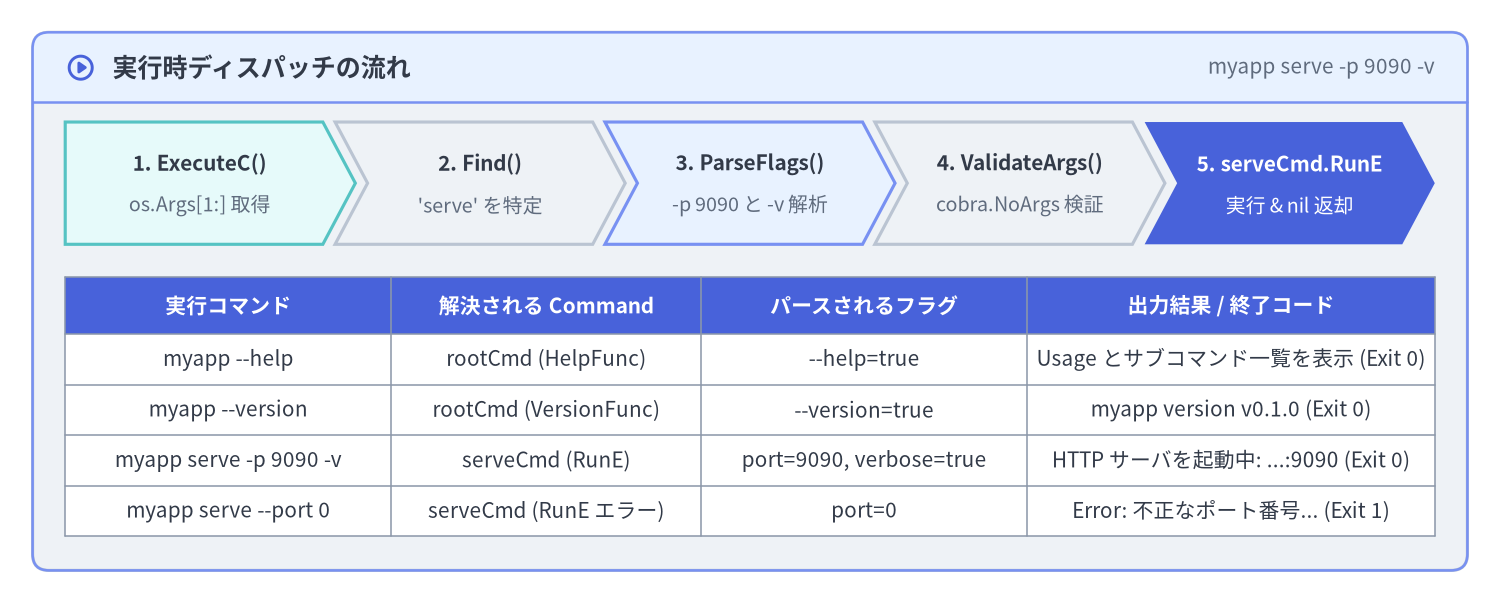
実際に go run . で各サブコマンドとフラグを実行し、自動生成されたヘルプやエラー出力を確認してみましょう。
# 1. 自動生成されたルートヘルプの確認(completion と help も自動追加される)
$ go run . --help
myapp は Cobra v1.10.2 で構築されたマイクロサービス管理 CLI です。

Usage:
  myapp [command]

Available Commands:
  completion  Generate the autocompletion script for the specified shell
  help        Help about any command
  serve       HTTP コントロールプレーンサーバを起動
  version     バージョン番号と Go ランタイム情報を表示

Flags:
  -h, --help      help for myapp
  -v, --verbose   詳細なデバッグログ出力を有効化
      --version   version for myapp

Use "myapp [command] --help" for more information about a command.

# 2. ローカルフラグ (-p) と親から継承した永続フラグ (-v) を組み合わせて serve を実行
$ go run . serve -p 9090 -v
[DEBUG] 詳細ログモードが有効です
HTTP サーバを起動中: http://127.0.0.1:9090

# 3. バリデーションエラー時の出力確認(SilenceUsage: true によりエラーメッセージのみが簡潔に出る)
$ go run . serve --port 70000
Error: 不正なポート番号 --port 70000: 1〜65535 の範囲で指定してください
重要 —
fmt.Print*ではなくcmd.Print*を使う習慣をつけよう:RunEの中でfmt.Printfではなくcmd.Printf/cmd.Printlnを呼んでいる点に注目してください。cmd.Print*はcmd.OutOrStdout()を経由して出力されるため、単体テスト時にcmd.SetOut(buf)で標準出力をメモリ上のバッファへ簡単にリダイレクトできます。
次のステップ
最初のサブコマンドツリーが動いたら、第2章: ファクトリ関数・Options・DI パターン へ進み、コマンド単位の *Options 構造体設計(Complete() -> Validate() -> Run())と依存性注入(DI)のベストプラクティスを学びましょう。